
Table of Contents
- Key Takeaways
- What Matrise is
- What Matrise has
- What you can do
- How this compares to what you probably already have
- Who it is for
- Your data stays yours
- Where it stands today
- Key Terms
- Frequently Asked Questions
- Start with one facility
About This Article
This article is authored by Spatial Reality Solutions, led by an ASPRS Certified Mapping Scientist and a Professional Licensee (Engineering) with the Association of Professional Engineers and Geoscientists of Saskatchewan (APEGS). SRS builds Matrise and delivers the reality capture and integration work that connects a facility to its operational systems.
Key Takeaways
- Matrise is one product holding a facility viewer, an asset register, a maintenance system and a field app, rather than an integration between four of them.
- A capture is enough to start. A model is optional, can be added later, and can come from any authoring tool.
- Work is raised against an asset that has a position in the space, so the work order, the inspection and the evidence all know where they are.
- The field app loads the jobs and the register onto a phone and runs with no signal. Equipment wears a QR sticker.
- It launches in January 2027, and your data comes back out in open formats: IFC, BCF and COBie.
What Matrise is
You step into a captured location and look around it as it stands in the facility. You select a piece of equipment and read its identifier, its documents, its condition and everything that has been done to it. From that same place you schedule its next inspection, raise a work order against it, and record the work once it is done.
A digital twin connects a physical facility to a digital record of that facility. In Matrise the record starts with a measured capture of the place, taken with a survey instrument that records the space as millions of points and 360-degree imagery. Everything else, the assets, their documents, the work done on them, hangs off where it belongs inside that capture.
That measured record is what you check the model and the paperwork against, because it shows the facility as it actually stood on the day it was captured.
What Matrise has
Four parts, built as one system rather than assembled from four products.
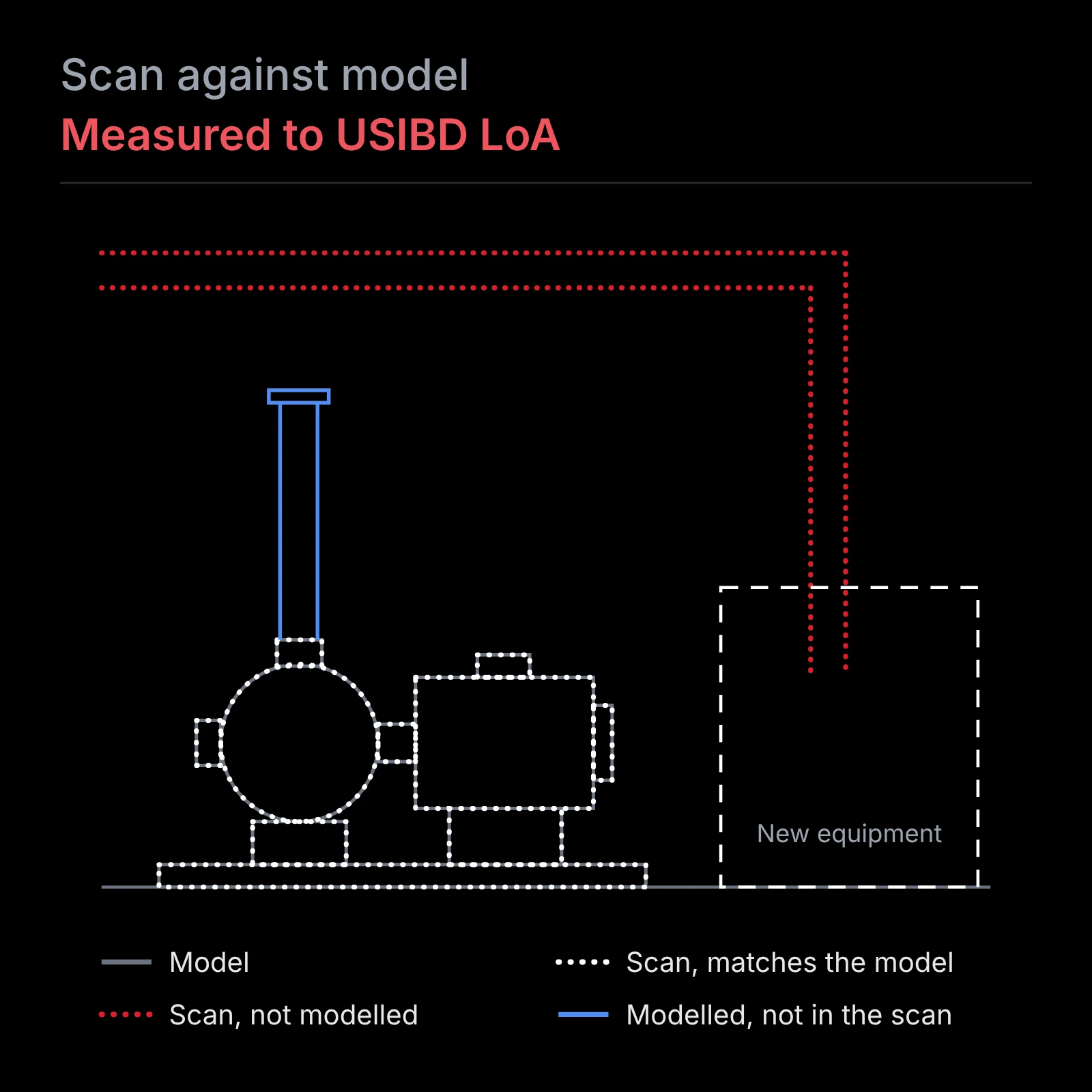
A viewer. Every site your organization holds on one map, each captured facility ready to enter, and 360-degree imagery of every captured location inside it. Where an engineering model exists it is drawn over the capture in the same coordinate space, so the same pipe occupies the same position in both, and Matrise colours the space by where the two disagree. Dimensions come straight off the record.
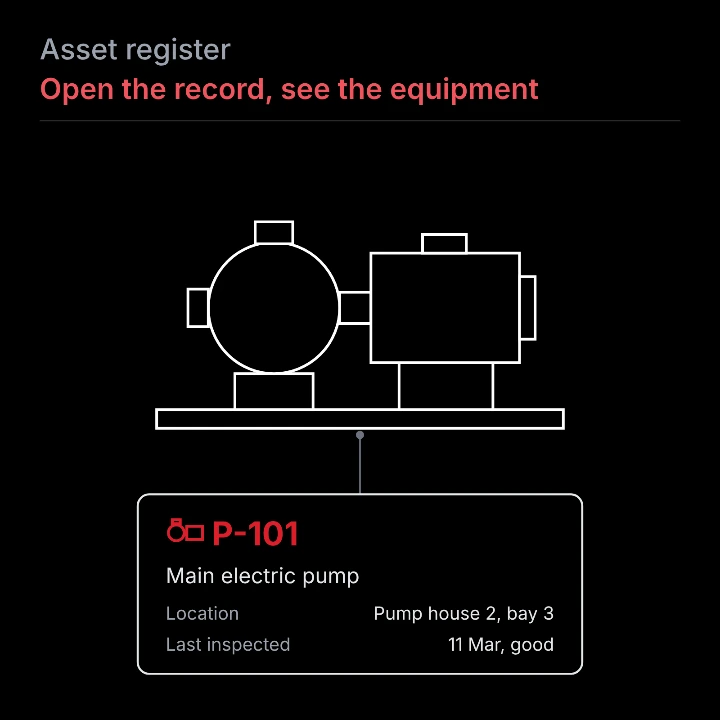
An asset register. Every maintainable asset with its identifier, its position in the facility, its equipment and service details, its documents, and the model elements it is tied to. Condition is recorded on the five level scale used across the industry, very good through very poor, and failure consequence is kept separate from condition so the two are never conflated. A register you already keep in a spreadsheet imports into it.
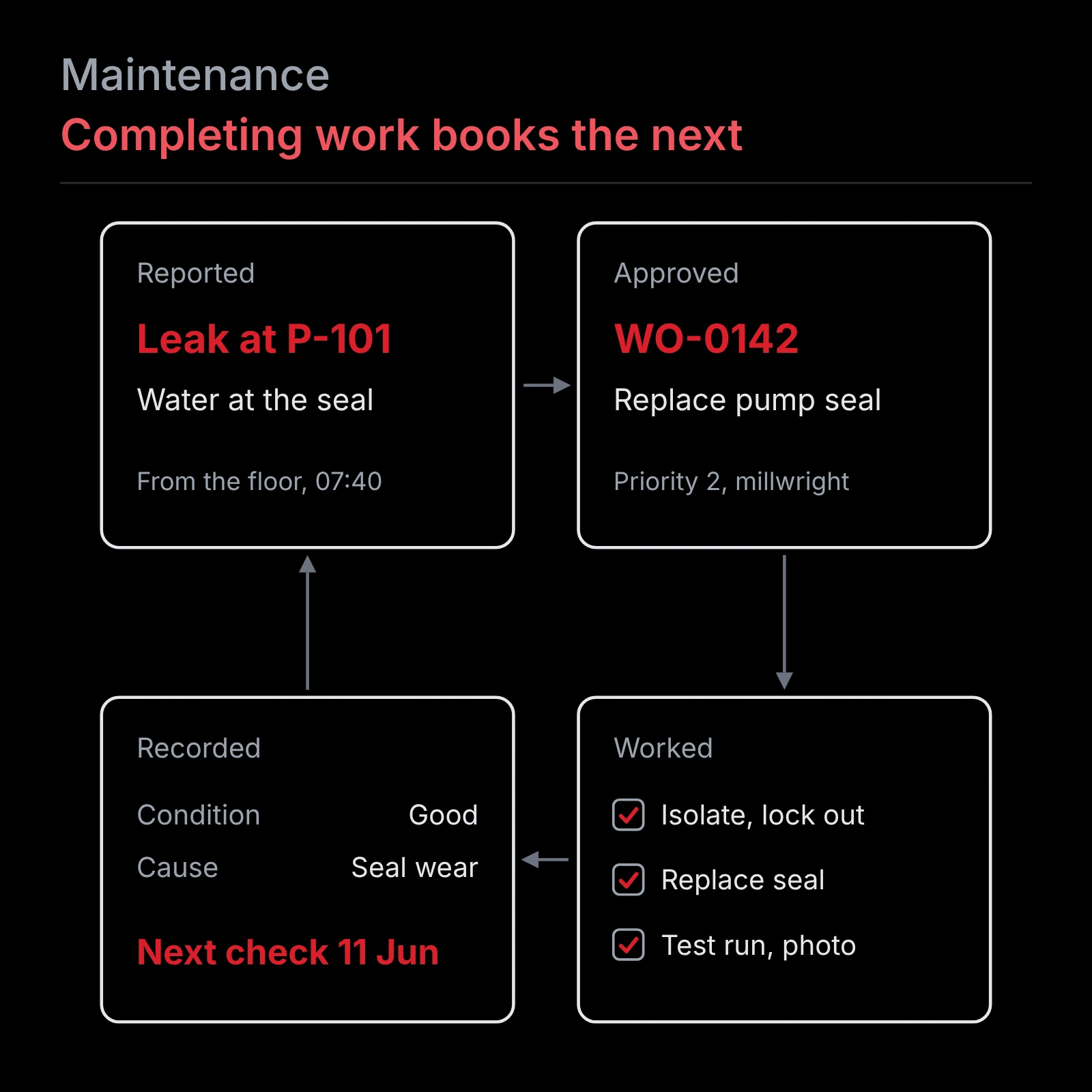
A maintenance system. Preventive schedules, inspections built from checklists, work orders that move through request, approval, assignment, completion and review, failure records, parts, vendors, photographic evidence, and the compliance reporting and dashboards drawn from all of it. Problems are pinned in the scene itself with a note, a priority and an owner, attached to the equipment they concern. Because every record is raised against an asset that has a position, the work and the place are one record rather than two that somebody has to reconcile.
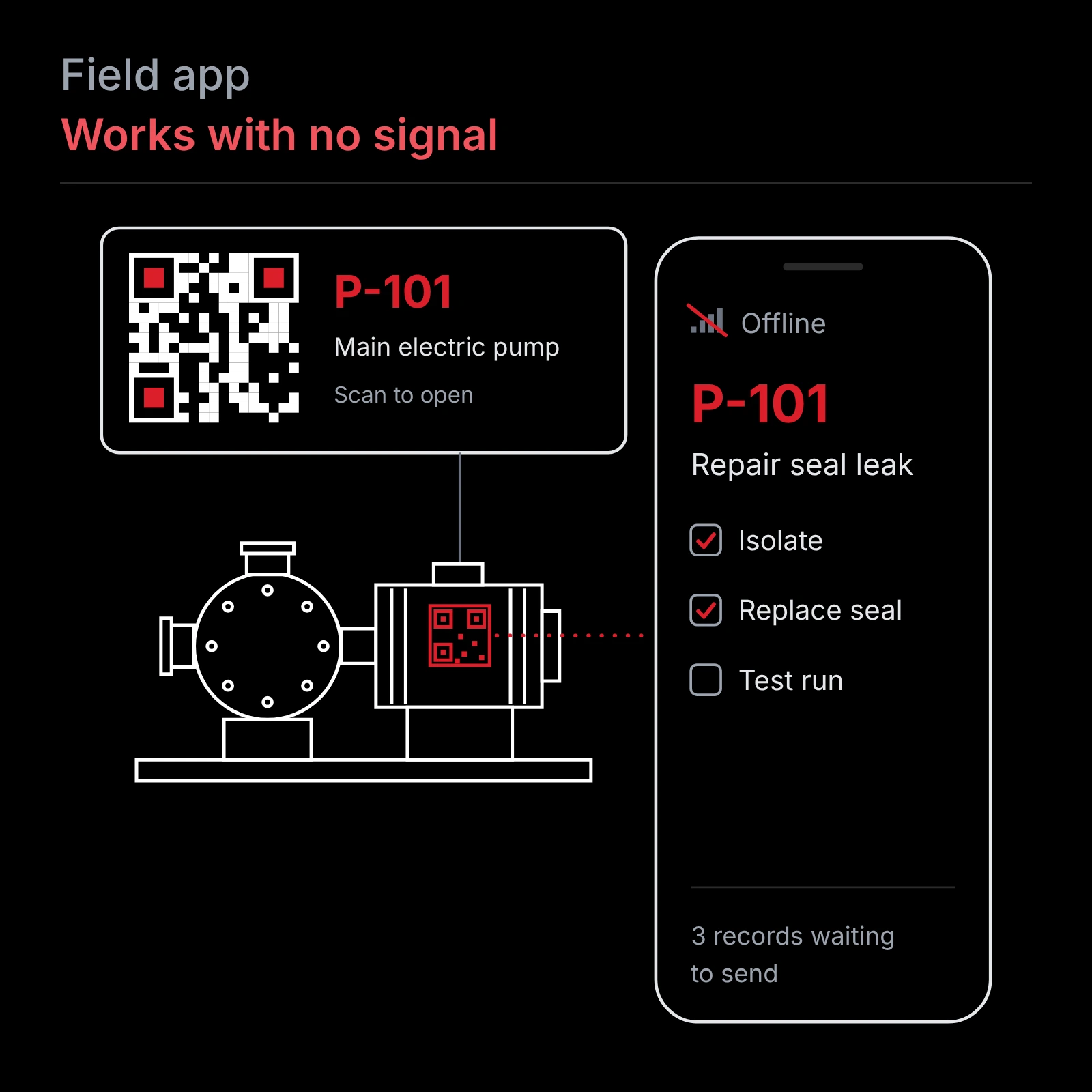
A field app. The work happens in pump rooms, basements and tunnels where there is usually no signal, so the app loads the jobs and the register onto the phone before anyone goes in. It carries the open work orders, the register, the checklist for each task, and recent history for the assets on that person's jobs. Equipment wears a QR sticker. Scan it, run the inspection, log the parts, photograph what you found. All of that works with nothing connected, and when the phone finds signal it sends without duplicating anything.
Access is granted per facility and per role. A contractor sees the job they are on and nothing else, and somebody accountable for ten sites sees all ten.
What you can do
Find any asset without knowing the site. Search the register or walk the space until you see it.
See inside a space before anyone enters it. Confined spaces, live process areas and anywhere needing a permit get assessed from the record, so entry happens once and for the work.
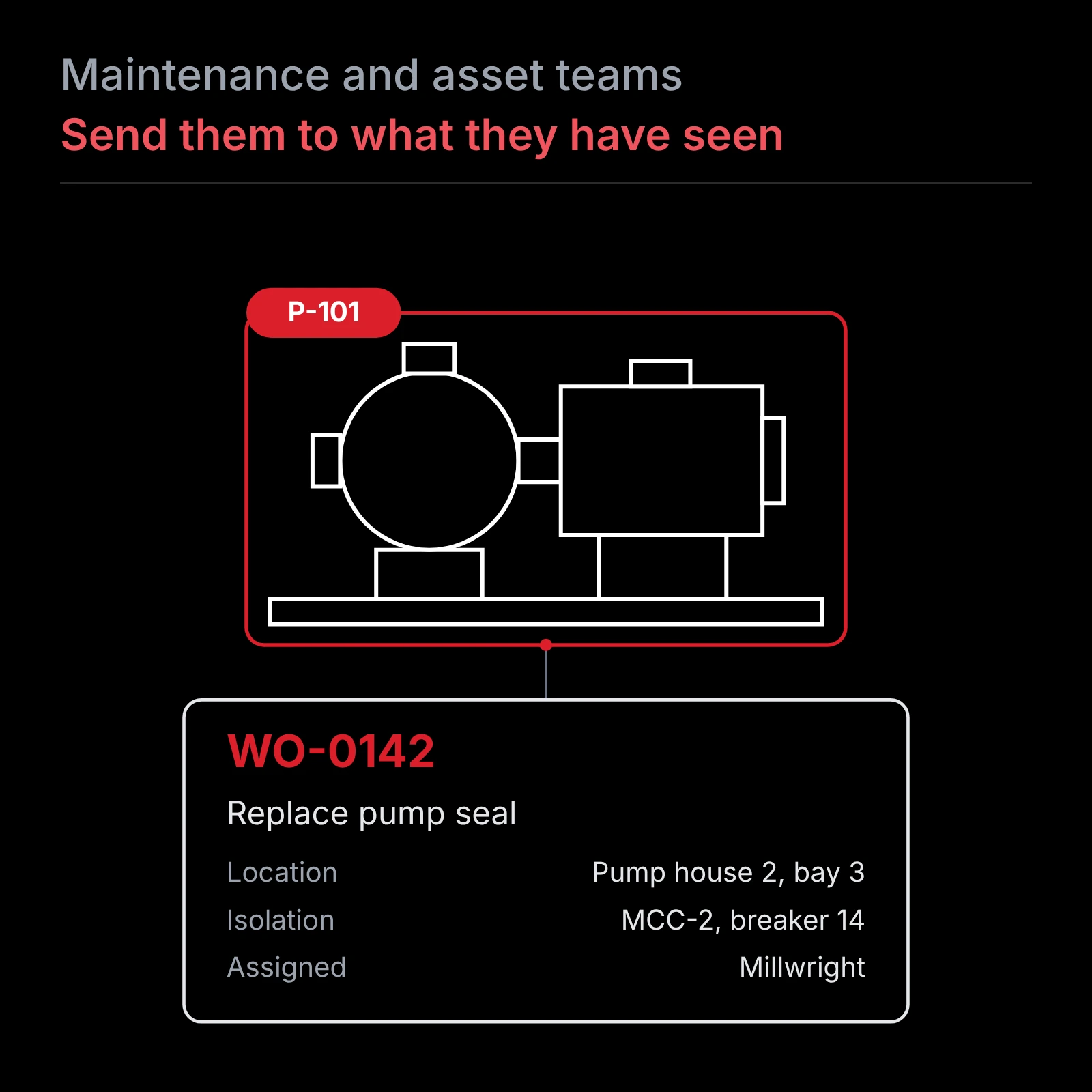
Plan access and isolation from the same view as the equipment. The valves that isolate a pump sit in the picture beside the pump, so the isolation list and the route in are settled before a crew is dispatched.
Scope a job once and have everyone work from the same conditions. A replacement or a shutdown is scoped from the record, and contractors and suppliers see what you see rather than each making their own visit and pricing their own assumptions.
Brief people before they arrive. New staff, contractors, vendors, inspectors and insurers can be walked through an area in a browser, which shortens the orientation and removes most of the reasons to be on site for it.
Keep what your long service people know. The operator who knows which panel feeds what is working in a facility that now holds a record of its own. When they retire, the facility keeps it.
Run the maintenance program against the twin. Schedules, inspections, work orders through approval and completion, failure history, parts and vendors, every one of them raised on an asset with a position.
Record the work where it happens. A technician scans the sticker on the equipment, runs the inspection, logs the parts, adds photographs and moves on. Nothing waits for somebody to get back to a desk, and nothing is retyped from a notebook.
Prove what was done. Every condition rating carries a date, with photographs wherever the checklist calls for them, and compliance reporting comes out of the maintenance record rather than being assembled from it afterwards.
Catch the difference between the model and the facility. Deviation is coloured in the space, so what somebody added years ago turns up before equipment is ordered to fit a set that does not include it.
How this compares to what you probably already have
Most people reading this already own part of the answer. The useful question is which part, and what it leaves you doing by hand.
If you have a reality capture platform, you can look at the facility and tag equipment inside it. What you cannot do is run work from it. No work orders moving through approval, no inspections against checklists, no parts, vendors or failure history, so the capture stays a reference and the work carries on somewhere else.
If you have a maintenance system, you can run the work, and you already hold the asset numbers, the schedules and the history. What it does not hold is where anything is. In most systems location is a free-text field. A text field cannot be queried spatially, so it cannot tell you what sits around an asset, how to reach it, or what has to be isolated to work on it. That is why technicians still go and ask whoever knows the plant.
If you have a spatial add-on bolted onto your maintenance system, you have fixed the pin on the map and bought a second product, a second vendor and an integration that has to survive both products' upgrades.
What a buyer asks | Capture platform | Maintenance system | Matrise |
|---|---|---|---|
Can I walk the space as it actually is | Yes | No | Yes |
Does the record know where an asset sits | A tag on geometry | A text field | A position in the space |
Can I see where the build differs from the model | Yes | No | Yes |
Can I raise, approve and close a work order | No | Yes | Yes |
Inspections, checklists, parts, vendors, failures | No | Yes | Yes |
Compliance reporting out of the work record | No | Yes | Yes |
A field app that works with no signal | No | Varies | Yes |
Products to buy for all of the above | Two | Two | One |
The last row is the one that is structural rather than a feature. Any of the capabilities above can eventually be claimed by somebody else. Being one product is not a feature, it is the reason the work order already knows where it is and what surrounds it, the inspection is completed standing in front of the asset, and the evidence attaches to a place rather than to a row in a table.
Who it is for
Matrise answers to the organization that owns the facility and pays to run it for the next thirty years. In practice that means the plant or facility manager, the maintenance planner and supervisor, the trades, and the capital planner who has to defend a number. What those places have in common is fixed equipment, a long service life and usually a compliance obligation attached to how it is maintained, whether that is a treatment plant, a hospital, a grain terminal or an arena. One facility counts. Engineers, architects and capture firms get real use out of it as well, the first two for existing conditions and the last for handing a client something they can actually open, but the product is built around the operator.
Your data stays yours
- Matrise uses open standards at the boundary, as import and export profiles rather than an internal constraint. Models come in as IFC, the buildingSMART data model for building and infrastructure information. Issues and review comments move both ways as BCF. The asset register exports as COBie, the standard facility handover format, carrying the maintenance schedule and the resources each task calls for.
- The record of what was actually done comes out through compliance reporting rather than a handover format, because COBie describes the maintenance plan and not the history against it.
Where it stands today
Matrise came out of client delivery work rather than a product plan, which is why it is shaped around what an operator asks for once the capture has been handed over. The viewer, the asset register, issue tracking, the maintenance system and the field app are built. The viewer and issue tracking are in use at client sites, and the full platform launches in January 2027. Self-serve upload and automatic detection of equipment from captured data are still in development.
Key Terms
Asset register - The list of equipment an organization has agreed to maintain, each item carrying an identifier and the data attached to it.
BCF - BIM Collaboration Format. An open format for passing issues, comments and viewpoints between software, so a problem raised in one tool opens in another.
CMMS - Computerized maintenance management system. The software a facility runs work orders, schedules and maintenance history in.
COBie - Construction Operations Building information exchange. A format for handing asset data to the people who will operate a facility, defined within the United States National BIM Standard and not limited to buildings.
Digital twin - A physical asset, a digital copy of it, and data moving between the two. A static model shows one moment. A twin stays current as the facility changes.
IFC - Industry Foundation Classes. The open data model for building and infrastructure information, standardized as ISO 16739-1.
Point cloud - The output of a laser scan: millions of measured three dimensional points describing the surfaces of a real space.
Scan to BIM - Building a model from captured data, so a facility that was never modelled gets one matching what is actually there.
Frequently Asked Questions
A model describes a facility at one moment, usually as designed or as documented. A digital twin is a physical asset, a digital copy of it, and data moving between the two, so it stays current as the facility changes. In practice the difference is whether the thing on screen knows which pump it is and when that pump was last serviced.
Because the part it is missing is where everything is. Location in most maintenance systems is a text field, so it cannot tell a planner what surrounds an asset, how to reach it or what has to be isolated. You can keep the system you have and import the register, or run the work in Matrise. Either way the gain is the same: the work order knows its own place in the facility.
Yes, and most arrive that way. The capture alone gives you a facility you can walk, an asset register and a maintenance record. A model can be added at any point afterwards, and it does not have to be one we produced.
Yes. Models arrive as IFC, issues move both ways as BCF, and the asset register exports as COBie with its maintenance schedule and resources. Completed work and inspection records come out through compliance reporting, since COBie carries the plan rather than the record of what was done.
Start with one facility
You do not start by digitizing a portfolio. Pick the one facility where answering questions already costs you the most, and we capture it, stand it up and hand it to the people who run it. They work from it for a season before anything else gets captured. If you already hold captures or a model from a past project, those come in rather than being redone.
That is a small enough commitment to prove or kill on your own site, and it settles the only question that matters, which is whether your people open it on a Tuesday without being told to.
Get in touch about which facility that would be, or see Matrise first.
Parts of this post are drawn from "Terrestrial Laser Scanning as the Foundation of Operational Digital Twins: From Field to Facilities," presented at the ASPRS 2026 International Technical Symposium on October 6 in the Lidar, Point Clouds and Digital Twins session. Recordings are available through ASPRS.